Remote control
your dev sessions.
A self-hostable daemon that lets you start, steer, and watch AI coding sessions from your phone. Pair once, control from anywhere.
A self-hostable daemon that lets you start, steer, and watch AI coding sessions from your phone. Pair once, control from anywhere.
One global npm package. That's it. No Docker, no config files.
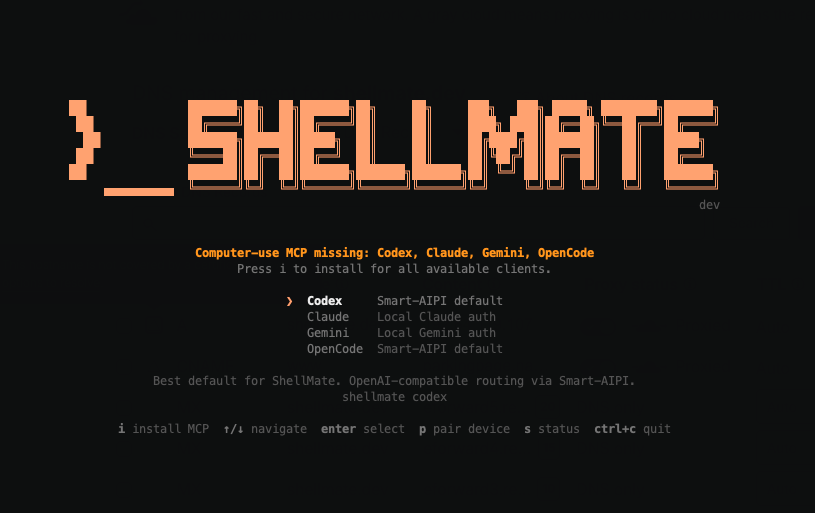
npm i -g shellmateRun shellmate and the TUI walks you through everything — pairing, provider selection, sessions.
Scan the QR to pair, pick a provider, and start steering AI sessions remotely.
Daemon, control plane, mobile app, web client. The entire stack is open and self-hostable.
ShellMate runs a persistent background process on your machine. It manages sessions, relays stdin/stdout between your devices, and maintains heartbeat connections to the control plane. Start it once, forget about it.
The TUI lets you browse providers, pick a profile, resume existing sessions, or start fresh. Navigate with arrow keys, hit enter, and you're streaming. Or skip the TUI entirely with shortcuts like shellmate claude.
Install Model Context Protocol servers for any supported client. ShellMate wires up the stdio transport and config files so your AI tools can interact with your machine through a standardized interface.
The entire stack is open source: daemon, control plane, CLI. Run it on your own infrastructure. Your prompts, your sessions, your data — none of it leaves your machines unless you want it to. Single-user, zero vendor dependencies.